
The ASP.NET framework provides built-in settings to control how to respond when application errors occur. This functionality is part of the Web.Config customErrors settings section.
Like most web.config settings, customErrors can be configured within the Machine.config, root web.config or your application’s web.config file. Usually, it is set in the web.config file for your application.
CustomErrors supports the following modes:
Example configuration:
<configuration>
  <system.web>
    <customErrors defaultRedirect="YourErrorPage.aspx"
                  mode="RemoteOnly">
      <error statusCode="500"
             redirect="InternalErrorPage.aspx"/>
    </customErrors>
  </system.web>
</configuration>
If your application is throwing errors, but you cannot see the full error message, you can disable customErrors.
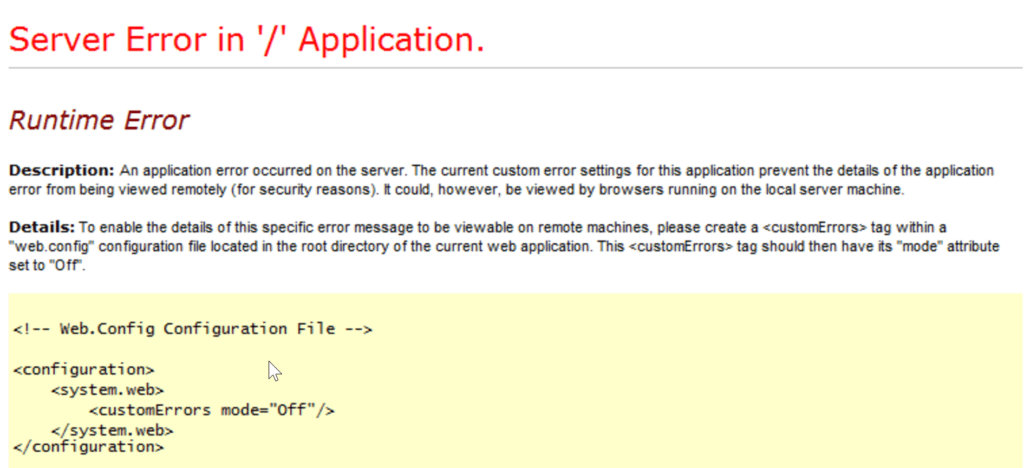
To do this, you will want to set customErrors mode to “Off” as shown below. Be careful as this could expose sensitive information shown in error messages as well as detailed stack traces. This is not recommended unless you have no other option and you should switch it back as soon as possible.
<configuration>
  <system.web>
    <customErrors mode="Off"/>
  </system.web>
</configuration>
There are other ways to track, find, and view application errors besides the ASP.NET yellow screen of death. Ideally, your application should be logging all of your errors to a log file and error monitoring service, like Retrace. You can also check Windows Event Viewer, and you may be able to see your exceptions. Although, be warned that exceptions are rate limited to Event Viewer and it does not record all of them.
Depending on your type of application, there are potentially multiple ways to do this. If your application has a Global.asax file, you can subscribe to unhandled exceptions as shown below and then log them with log4net, NLog, Serilog, or some other logging framework.
public class WebApiApplication : System.Web.HttpApplication
{
	log4net.ILog log = log4net.LogManager.GetLogger(typeof(WebApiApplication));

	public override void Init()
	{
		base.Init();
		this.Error += WebApiApplication_Error;
	}

	void WebApiApplication_Error(object sender, EventArgs e)
	{
		var ex = Server.GetLastError();
		log.Error(ex);
	}
}
You may also want to look at setting up Filter objects with MVC or Web API:
Exception Handling in ASP.NET Web API
Filtering in ASP.NET MVC
Retrace provides code-level performance monitoring for your application. Part of that includes collecting all application exceptions. Retrace can collect unhandled exceptions, exceptions explicitly logged to it, or every single exception ever is thrown (first chance exceptions).
To make the most of your application errors, you should use an error monitoring service, like Retrace. Some of the benefits of an error monitoring service:
More resources:
Stackify's APM tools are used by thousands of .NET, Java, PHP, Node.js, Python, & Ruby developers all over the world.
Explore Retrace's product features to learn more.