
Retrace will reach End of Life on March 31, 2027. Click here to learn more.

How to Monitor IIS Performance: From the Basics to Advanced IIS Performance Monitoring

By: mwatson
  |  September 20, 2019
How to Monitor IIS Performance: From the Basics to Advanced IIS Performance Monitoring

Need help on how to monitor IIS? This guide covers the basics, including HTTP ping checks, IIS Application Pools, and important Windows Performance Counters.

In addition, we’ll take a look at how to use an application performance management system to simplify monitoring IIS and get more advanced IIS performance monitoring for ASP.NET applications.

Without monitoring IIS performance, you could end up leaving your site (and your users) hanging which, at best, will leave a bad taste in your user’s mouths and at worst, they’ll stop using your services.

So, let’s get into this guide, where we’ll start with the basics and then move into more advanced ways to monitor IIS performance.

Java application monitoring metrics

From Basics to Advanced IIS Performance Monitoring

  • Ensuring your IIS Application is running.
  • Windows performance counters for IIS & ASP.NET.
  • Advanced IIS performance monitoring for ASP.NET.

How to Monitor If Your IIS Application Is Running

The first thing you want to do is set up monitoring to ensure that your application is running.

Website Monitor Via HTTP Testing

One of the best and easiest things you can do is set up a simple HTTP check that runs every minute, which will give you a baseline to know if your site is up or down. In addition, it can also help you track how long it takes to respond.

For instance, you could monitor for a 200 OK status or similarly, the request may return specific text that you know should be included in the response.

As a side note, be careful not to rely on cached responses in your check since a 200 status response is cacheable.

Additionally, monitoring IIS via a simple HTTP check is a good way to establish a basic SLA monitor, which you can use no matter how many servers you have, to know if your web application was online and available.

For example, one of the HTTP checks we use against Elasticsearch to help with monitoring it. We do this via Retrace.

In this example, we receive alerts if the number_of_nodes is not what we are expecting or if it doesn’t find an HTTP status of 200 OK.
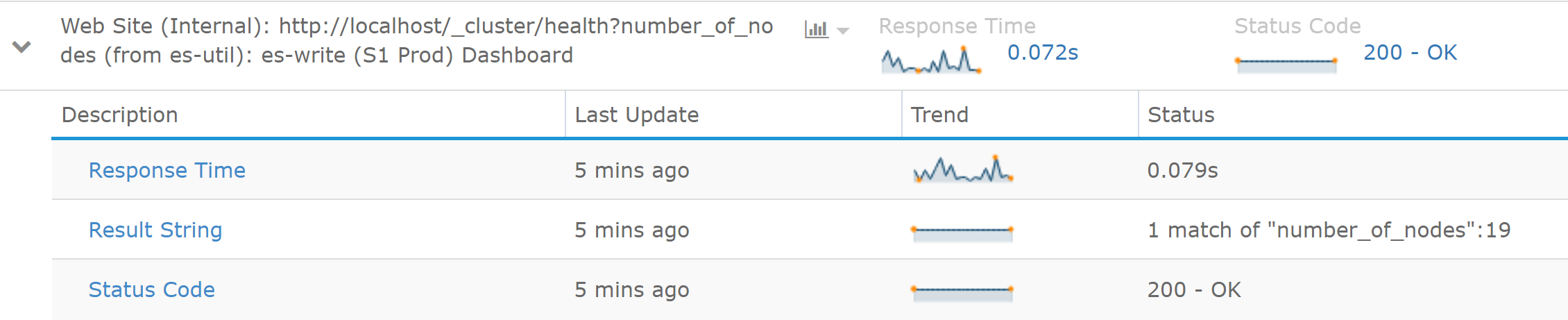
Monitor IIS with HTTP Check
Screenshot from Stackify’s Retrace.

Ensure Your IIS Application Pool Is Running

If you’ve been using IIS for a while, you’ve probably witnessed times when your application mysteriously stops working.

After some troubleshooting, you may find that your IIS Application Pool is stopped for some reason, which causes your site to go offline and your savvy users to check Downdetector to see if it’s you or them.

Sometimes an IIS Application Pool will crash and stop for any of several reasons.

For example, fatal application errors can kill the Application Pool. Other causes can be the user the app pool is running under, bad configurations, or other random problems. The Application Pool can get into a state where it won’t start at all.

Above all, it’s important to always monitor that your IIS Application Pool is started. It runs as w3wp.exe.

Most monitoring tools have a way to monitor IIS Application Pools. For example, Retrace monitors them by default.

As a side note, app pools can be set to “Started” but may not actually be running as w3wp.exe if there is no traffic to your application.

In these scenarios, w3wp.exe may not be running, but there’s no actual problem, which is why you need to monitor it via IIS’s status and not just look for w3wp.exe to be running on your server.

Recommended Performance Counters for IIS Monitoring

One of the advantages of using IIS as a web server is all of the metrics available via Windows Performance Counters. There’s a wide array of them available between IIS, ASP.NET and .NET.

For this guide on IIS performance monitoring, I’m going to review some of the top Performance Counters to monitor.

To simplify things a bit, I’m going to split the Performance Counters up between IIS and ASP.NET particular Performance Counters. All of these are monitored by default as part of Retrace’s application metrics monitoring.

System/Process Counters

  • CPU %: The overall server and CPU usage for your IIS Worker Process should be monitored.
  • Memory: You should consider tracking the currently used and available memory for your IIS Worker Process.

IIS Performance Counters

  • Web Service: Bytes Received/Sec. Helpful to track to identify potential spikes in traffic.
  • Web Service: Bytes Sent/Sec. Helpful to track to identify potential spikes in traffic.
  • Web Service: Current Connections. Through experience with your app, you can identify what is a normal value for this.

ASP.NET Performance Counters

  • ASP.NET Applications: Requests/Sec. You should track how many requests are handled by both IIS and ASP.NET. Some requests, like static files, could only be processed by IIS and never touch ASP.NET.
  • ASP.NET Applications: Requests in Application Queue. If this number is high, your server may not be able to handle requests fast enough.
  • .NET CLR Memory: % Time in GC. If your app spends more than 5% of its time in garbage collection, you may want to review how object allocations are performed.
  • Watch a video on how to monitor ASP.NET performance counters. 

ASP.NET Error Rate Counters

  • .NET CLR Exceptions: # of Exceptions Thrown. This counter allows you to track all .NET exceptions that are thrown even if they are handled and thrown away. A very high rate of exceptions can cause hidden performance problems.
  • ASP.NET Applications: Errors Unhandled During Execution/sec. The number of unhandled exceptions that may have impacted your users.
  • ASP.NET Applications: Errors Total/Sec. Number of errors during compilations, pre-processing and execution. This may catch some types of errors that other Exception counts don’t include.

MORE: MSDN on ASP.NET Performance Counters

You should be able to monitor these Windows Performance Counters with most server monitoring solutions.

Additionally, some Windows Performance Counters are difficult to monitor because of the process name or ID changes constantly, which makes it hard to monitor them in some server monitoring solutions due to this.

If you are looking for a simple to use ASP.NET performance monitoring solution, that is easy to use, be sure to check out our product, Retrace.

Advanced IIS Performance Monitoring for ASP.NET

Some application monitoring tools, like Retrace, are designed to provide holistic monitoring for your ASP.NET applications.

To get started, all that you have to do is install them, and they can auto-detect all of your ASP.NET applications. From there, it will automatically start monitoring all the basics.

Retrace will monitor IIS key Performance Counters and the state of your IIS Site and Application Pool.

Besides the basic checks, Retrace also does lightweight profiling of your ASP.NET cod, giving you code-level visibility to understand how your application is performing and how to improve it.
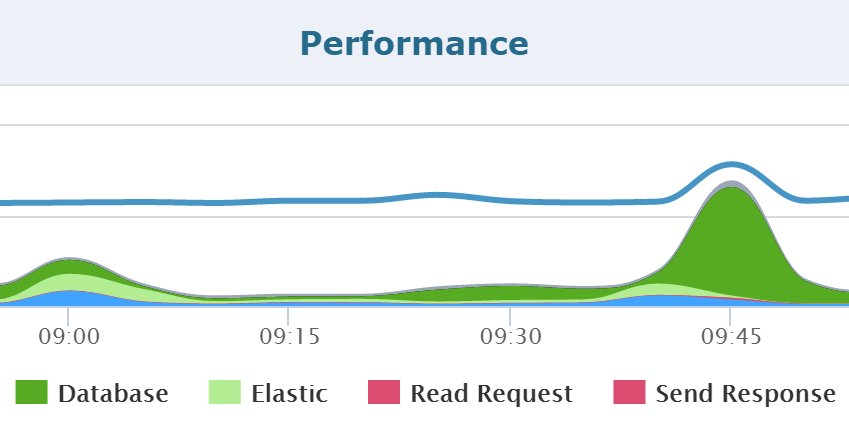
Retrace Application Performance Dashboard

Benefits of Advanced Application Performance Monitoring (APM)

Track performance of every ASP.NET web request in your application:

Things to Remember about IIS Monitoring

How you monitor IIS can be as simple or robust as you would like.

While, a basic HTTP test is the simplest way to keep tabs on whether or not your site is up and running and gives you checks on IIS itself or monitor IIS using performance counters, it is not enough.

To really understand the performance of your application, you should check out an application performance management system like Retrace, which does so much more!

More: How to Troubleshoot IIS Worker Process (w3wp) High CPU Usage

Start Free Trial

Improve Your Code with Retrace APM

Stackify's APM tools are used by thousands of .NET, Java, PHP, Node.js, Python, & Ruby developers all over the world.
Explore Retrace's product features to learn more.


Learn More
pucuk4d indobet toto slot slot depo 10k toto toto bobatoto daftar logototo patentoto situs toto slot 4D toto bayitoto popotogel prize hongkong malam ini joker11 lingkartoto depo 5k panen100 semibola slot sbobet88 sbobet88 https://nolimithoki.dev/ dinasti33 slot slot88 slot jepang slot depo 5k https://www.juara288.asia/ slot 4d toto toto situs toto flokitoto slot gacor logototo slot depo 5k bobatoto bobatoto bobatoto sontogel mpo slot situs toto slot situs slot bobatoto kari4d kari4d kari4d kari4d pascol4d pascol4d pascol4d toto slot slot gacor bento11 link situs slot toto slot titi4d slot gacor toto toto slot toto situs slot situs slot situs slot https://www.asupan188.dev/ slot gacor gampang menang toto slot gacor bwo303 situs toto toto slot slot gacor slot88 slot gacor situs slot link slot situs toto slot gacor pucuk4d PASCOL4D situs slot link slot pajaktoto slotvip situs toto toto slot situs slot situs slot situs slot toto slot gacor slot777 situs slot link slot situs judi bola POPOTOGEL : Situs Resmi Bandar Toto Togel Macau dengan Prediksi Gokil Pasti Akurat slot gacor link slot slot gacor situs slot slot gacor slot gacor situs slot link slot gacor Slot88 Slot88 toto slot slot gacor situs toto toto toto slot pulsa slot777 link slot gacor situs gacor toto slot slot gacor leon188 slot gacor bandarqq slot gacor slot gacor Slot88 slot gacor Slot88 situs slot slot gacor poker online slot88 Slot88 link slot gacor 100CUCI biolabet biolabet slot gacor slot terbaru slot gacor situs gacor jpmania situs slot slot gacor situs slot Situs Slot POPOTOGEL: Regulasi Bandar Situs Togel Resmi & Bola Mix Parlay Asia Terpercaya StreamEast starjp bungaslot Jpmania slot resmi slot slot resmi slot bayitoto patentoto link gacor slot gacor kari4d slot demo slot gacor AMANAHTOTO slot gacor slot gacor StreamEast AMANAHTOTO slot gacor pascol4d kari4d AMANAHTOTO